Skip to content

u3a SiteWorks

  • Start here
  • News
    • Monthly Newsletters
    • Oversights: u3a activity info
    • Find a u3a (Trust’s site)
    • Operational and Enhancement updates
    • Project History
  • FAQs
  • Web Manager
    • Learning Guides
      • Foundation Admin Guide (PDF)
      • Foundation Editing Guide (PDF)
      • Group Authors Guide (PDF)
    • User Guide
    • ‘How tos’ basics
    • ‘how-tos’ in depth
    • Videos
    • Operational Procedures (PDF)SiteWorks Operational procedures – what you should do and not do
    • Maintenance tasks Guide (PDF)
    • Enhancement updates
    • Icons for your site
  • New to SiteWorks
    • Introduction
    • Learn WordPress Links
    • Drop-in Q&A sessions
    • Moving to SiteWorks
    • Install Local WP and Demo site
    • Roles and functions
  • The Team
    • Our Volunteers
    • Volunteer Opportunities
  • Contact

u3a SiteWorks offers a website presence solution for u3as, Networks and Regions. WordPress websites are provided on a managed platform supported by a team of Trust volunteers.

For general information start by browsing the menu FAQs.

To find u3a websites local to you and nationwide use menu News > Oversights: u3a activity info

Screenshots of u3a SiteWorks home pages

This non-technical video introduces SiteWorks and its benefits:

Have a general question or need Help?

For Technical queries try our User Guide – menu Web Manager > User Guide
Also browse knowledge snippets Web Manager > ‘How to’ articles

You are also welcome to raise a support ticket using this button:

Click to raise a Help Desk query

The button launches a form hosted by the Third Age Trust.

The buttons launch forms hosted by the Third Age Trust.

Seeking a SiteWorks Site for your u3a?

If you don’t yet have a SiteWorks site you can contact us to find out more about what’s involved.

Click to receive information

For an overview of the steps involved see the Interested in a site? tab above.

Update your registration details?

We need a contact for your site so we can email about operational matters as well let you know about drop-in sessions and occasional Newsletter.
We call site Administrators or Editors ‘Web Managers’. One or two can be registered with us

Click to launch registration form

New Web Manager?

Linked on the Web Manager > New to SiteWorks menu above includes:

  • Introduction Videos and Learn WordPress links
  • Drop-in Q&A session info.
  • Moving to SiteWorks
  • Install Local WP and Demo site

See also Web Manager > Learning Guides

Site Web Manager or editor?

Linked on the Web Manager menu above are:

  • The User Guide
  • Foundation learning guides including Group authors Guide (PDF)
  • ‘How to’ articles
  • Videos
  • Operational Procedures (PDF)
  • Enhancement updates

This flowchart is an overview of the steps to create a new u3a SiteWorks website. Note that one of our Supporters will be allocated to work with you on all the steps.
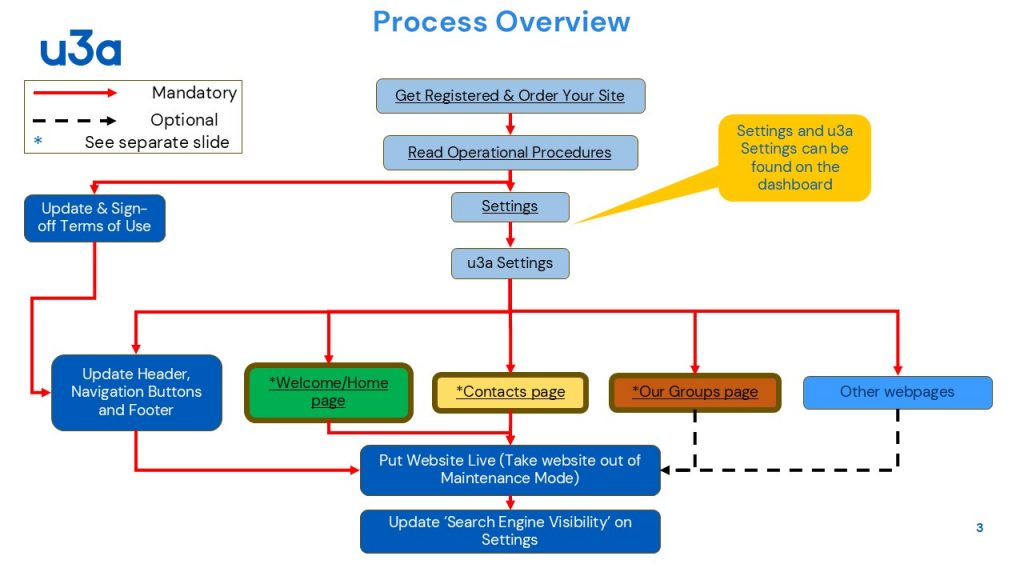
You can get in touch to register interest using the Register tab above.

The slides below have more detail one the web pages:

u3a Siteworks Journey v1.0Download

Theme developed by u3a SiteWorks team