
This article explains how the contact form works at a broad level. The User Guide has full details.
Contact forms are a mechanism for a visitor to send an email while not revealing the email address of the recipient. They also have fields to capture specific information.
Invoking the Contact form
A site visitor wishing to make contact will typically use the ‘Contact’ menu and then select a clickable link for whom they wish to contact, ‘Chair’ “Web Manager’ for example.
Clickable links to launch the contact form use a WordPress shortcode (see the ‘About Shortcodes and Blocks’ article). Assuming “Chair” is defined in u3a Contacts this can be as simple as:
[u3a_contact name="Chair"]By default this opens the Contact Us page that includes the SiteWorks contact form.
The Contact form
SIteWorks comes with a basic contact form:
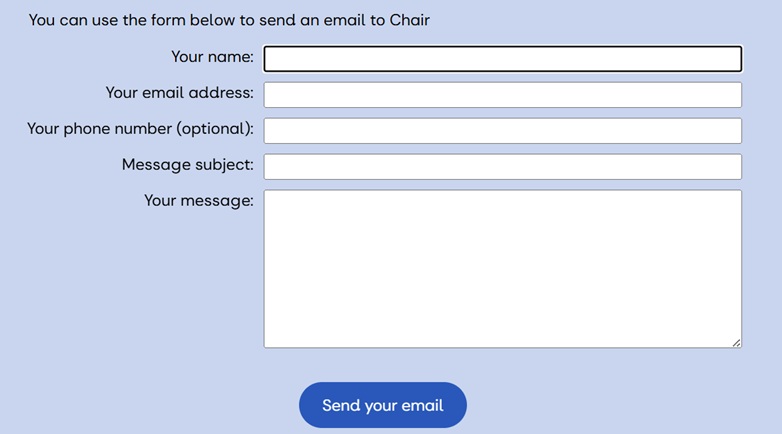
This example has been invoked to contact the Chair, otherwise the form always looks like this – the questions and fields cannot be changed.
SiteWorks comes with the Contact Us page. This is not a page visitors should arrive at from to the site’s menu or a button somewhere. It must be opened using the u3a_contact shortcode described above,

The Contact Us page can be edited to customise it with descriptive text and perhaps change the image etc.
Additional features and observations
The shortcode to invoke the contact form can include an email address. Best practice is to place email addresses in u3a Contacts so that a change of email address only needs to be updated in one place. That said, there are some contacts that should probably not be in u3a Contacts, a speaker who is happy to answer further questions on a talk for example. In that case use the email parameter for u3a_contact:
[u3a_contact name="Astronomy speaker" email="anotherplanet@ggmail.com"]By default the shortcode opens the Contact Us page. The form can also appear in other pages by inserting the shortcode:
[u3a_contact_form]To direct the shortcode u3a_contact to use a different page (to the Contact Us page) use the parameter slug=”group-enquiries” where “group-enquiries” is the slug of the page. The slug name can be seen by listing All Pages (or All Posts) and clicking Quick Edit.
While it is possible to never use the SiteWorks provided Contact Us page by using slugs, it is best not to delete it – if only because it will confuse future Web Managers of your site.
If you require a more customisable form – more fields, pick-lists, radio buttons, tick boxed then investigate 3rd party plugins. A couple are discussed in the article ‘Forms on your SiteWorks site’.