
Show a YouTube (or other hoted) video on your site
SiteWorks does not support uploading videos (ref. Web Manager > Operating Procedures) but it is easy to have a video on, typically, YouTube and display that on part of your screen.
Firstly locate the URL link to your video. For YouTube this needs to be a URL in the form https://youtube.com/watch? (the watch? seems to be the important bit). You can get this from your browser when playing the video.
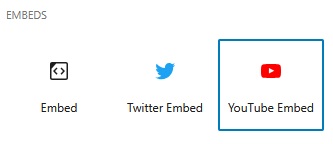
Insert an ‘Embeds’ block. Use YouTube or Embed.
Both Embeds block widgets have a box to place a link to your video Click on ‘Embed’.
You will almost certainly get the message “Sorry, this content could not be embedded”. Ignore this – don’t bother with Try again.
When you view the Page/Post you should see the control to play the video.
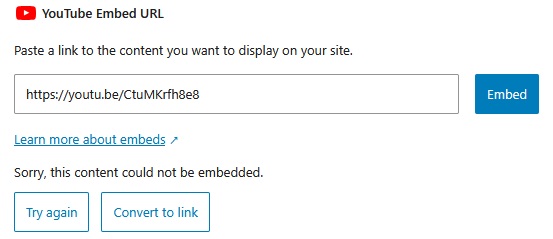
You can use an Embed block for YouTube videos – the results appear to be identical.
If this doesn’t work, or you want more control over the size and controls of the video viewing window, then use a “Custom HTML” widget (start typing /Custom in a new block is a quick way to insert it).
For YouTube, copy and paste the below into the Custom HTML. This will show the ‘Retirement is just the beginning’ cartoon video on the home page of u3a.org.uk. Change the “https://…………...” to the URL of your YouTube hosted video and don’t overlook the ‘title’ and while this doesn’t see to appear visually is will be used in searches.
<div style="width: 80%; max-width: 900px; aspect-ratio: 16 / 9; margin: auto;">
  <iframe src="https://www.youtube.com/embed/EI1I0sPW1WY"
          title="Retirement is just the beginning | u3a UK"
          style="width: 100%; height: 100%; border: 0;" allow="accelerometer; autoplay;
          clipboard-write; encrypted-media; gyroscope; picture-in-picture; web-share" allowfullscreen="">
  </iframe>
</div>
This will present a video window that is centred using 80% the width of your WordPress canvas. It will never be more than 900px wide. Try out your own settings.
YouTube can also provide embed code for you – right click the video for the menu option when the video is displayed on youtube.com
Other streaming services also generate code to embed.
Below is the YouTube embed code generated in June 2026 for the same video.
<iframe width="1183" height="665"
   src="https://www.youtube.com/embed/EI1I0sPW1WY"
   title="Retirement is just the beginning | u3a UK"
   frameborder="0" allow="accelerometer; autoplay; clipboard-write; encrypted-media;
   gyroscope; picture-in-picture; web-share" referrerpolicy="strict-origin-when-cross-origin"
   allowfullscreen>
</iframe>