Group, Event etc. information form disappears
When creating or editing any of the u3a posts (Groups, Events, Venues, Contacts, Notices) there is an information form at the bottom to enter and edit the content. This form can seem to disappear of move between columns. This article shows how to control it.
The information form is usually positioned towards the bottom of the central editing panel leaving space to enter a description:
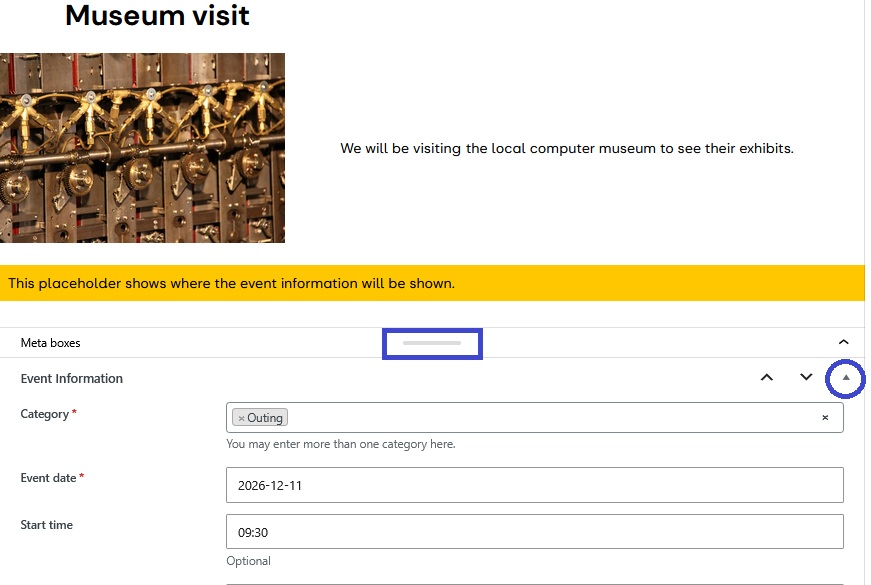
There is an up and down ‘slider’ called Meta boxes that will change the size of the area displaying the form. Grab hold of the area in the blue rectangle above (or anywhere on the bar) and move it up or down. Meta box is a technical term for a form such as ‘Event Information’ above.
If you don’t see the form appear with you pull up the slider this short video (no sound) shows how to recover it.
The small triangle (highlighted in the blue circle) will collapse the whole form leaving a single bar underneath the ‘slider’ called Meta boxes While this creates more space to add a description of the Event (or Group, Venue), it is easier to use the Meta boxes slider given SiteWorks only has one form per screen.
Note the triangle is highlighted in a blue circle by WordPress and will restore the form.
When restored, the triangle remains in a blue circle until you click elsewhere on the page.
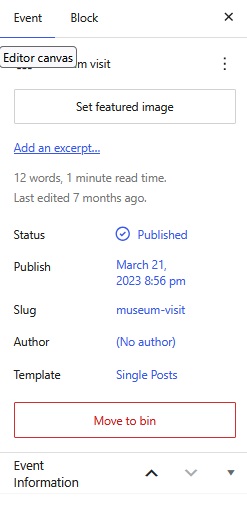
There are two arrows on the left. Click on the down arrow and the form will move to the Setting panel on the right-hand column. This is not generally useful but can happen by mistake.
To restore the form back to the main panel:
Make sure that the ‘Event’ (or Group’/Venue) tab rather than ‘Block’ tab is selected.
The up arrow by Event Information (or Group.Venue Information) moves the form back to the main editing panel.
Note if the form completely disappears the settings panel is collapsed. Open the setting panel using the icon on the very top-right of the screen, highlighted in the blue square: