
As the site develops, the Website Administrator should monitor revisions to pages and posts. This information is accessible in WordPress when editing. It should be noted that the approach in WordPress does not provide any related information, such as attempted logins.
In the right-hand sidebar, details of the latest revision (A) and the total number of revisions are recorded. In this case, the page has been edited four times since the page was created.
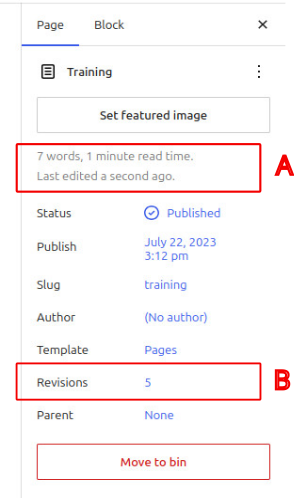
Clicking on the revision number shows the following, where
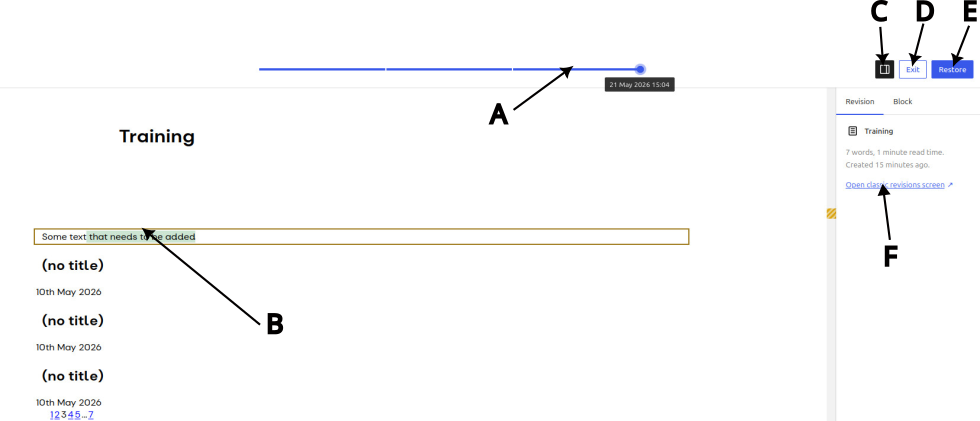
- A scroll Bar (A), that allows the page or post to be viewed with a specific set of revisions.
- The actual revision made at this time is highlighted (B).
- The sidebar can be hidden by selecting C.
- Select D to exit the revision mode and return to the edit view.
- By selecting Restore (E), the editor version will be reset to the selected version.
- If a more detailed HTML view is required, select the classic version, F. In the example below a single change has been made to the page title:
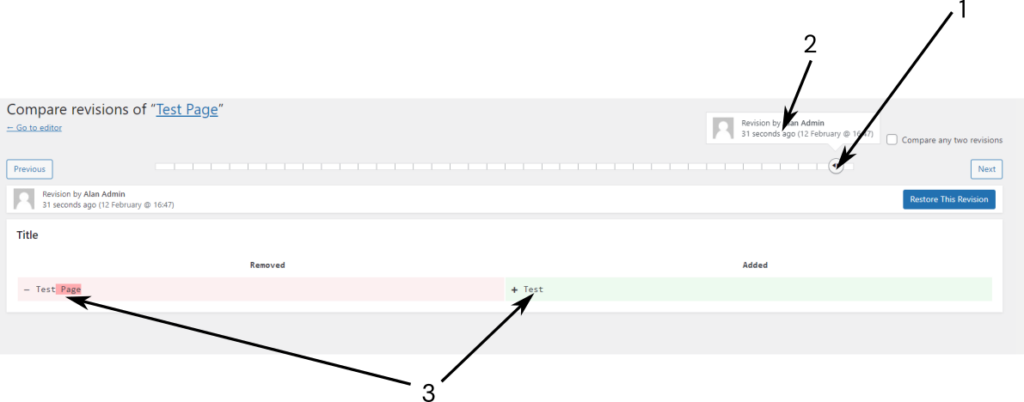
- A slide bar (1), allows each revision to be inspected, and who made the change and when is also shown (2).
- The change is shown below under Removed and Added, in this case, a single change was made to the page title. In this case, no changes were made to the page content.
If a change to the content is made, the following is displayed

The highlight shows that a small amount of text was removed from a paragraph.


